Home › Solutions › Zones & Variable Rate Prescriptions

Zones & Variable Rate Prescriptions

Turn field variability into a plan for action

Build smarter zones. Write field-ready prescriptions.

Use soil tests, imagery, yield data, and other spatial layers to build management zones that reflect what’s happening across the field. Assign rates by zone or use formulas to calculate rates from soil test data and agronomic targets. Then bring your maps, prescriptions, field information, and supporting details together in a map book that’s ready to share or take to the field.

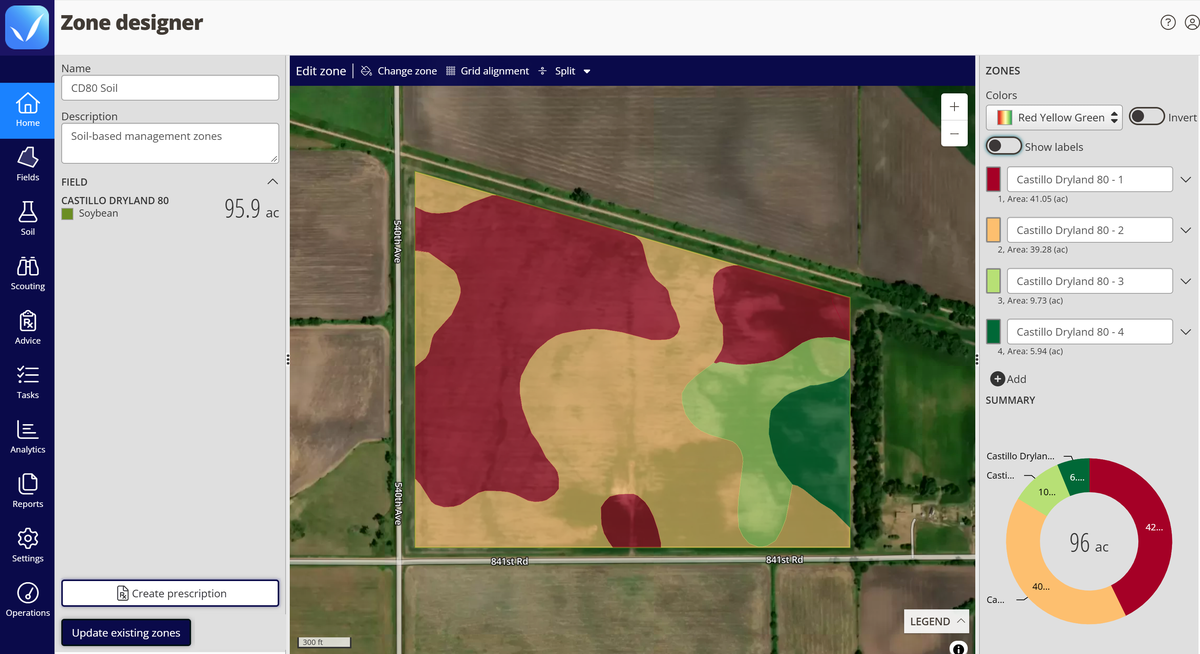
Zone designer in the QA Advisor web app for Castillo Dryland 80, a 95.9-acre soybean field, showing four soil-based management zones on a satellite map, with the acres for each zone listed and charted beside it.

Choose the right approach for every field

Not every field needs the same level of precision. Build management zones and assign rates to create straightforward variable rate prescriptions, or use formula-based calculations to turn soil test data and agronomic targets into prescriptions across multiple fields.

Need maps without prescriptions? Map books work on their own, giving your team organized field maps and data to take to the field or shop.

Build zones from the data you trust

Good prescriptions start with good zones. Build custom management zones from satellite imagery, yield history, elevation, soil type, electrical conductivity, or other spatial data you already have. If one data source doesn’t tell the whole story, use the layers that do.

Use current and historical NDVI imagery to identify patterns in crop vigor and variability, so you can start evaluating field trends without waiting years to build your own history.

NDVI tracks variation in fertility, moisture, and crop health across a field, with 5 years of historical data, which means you can start working with real trend data on day one, not years from now.
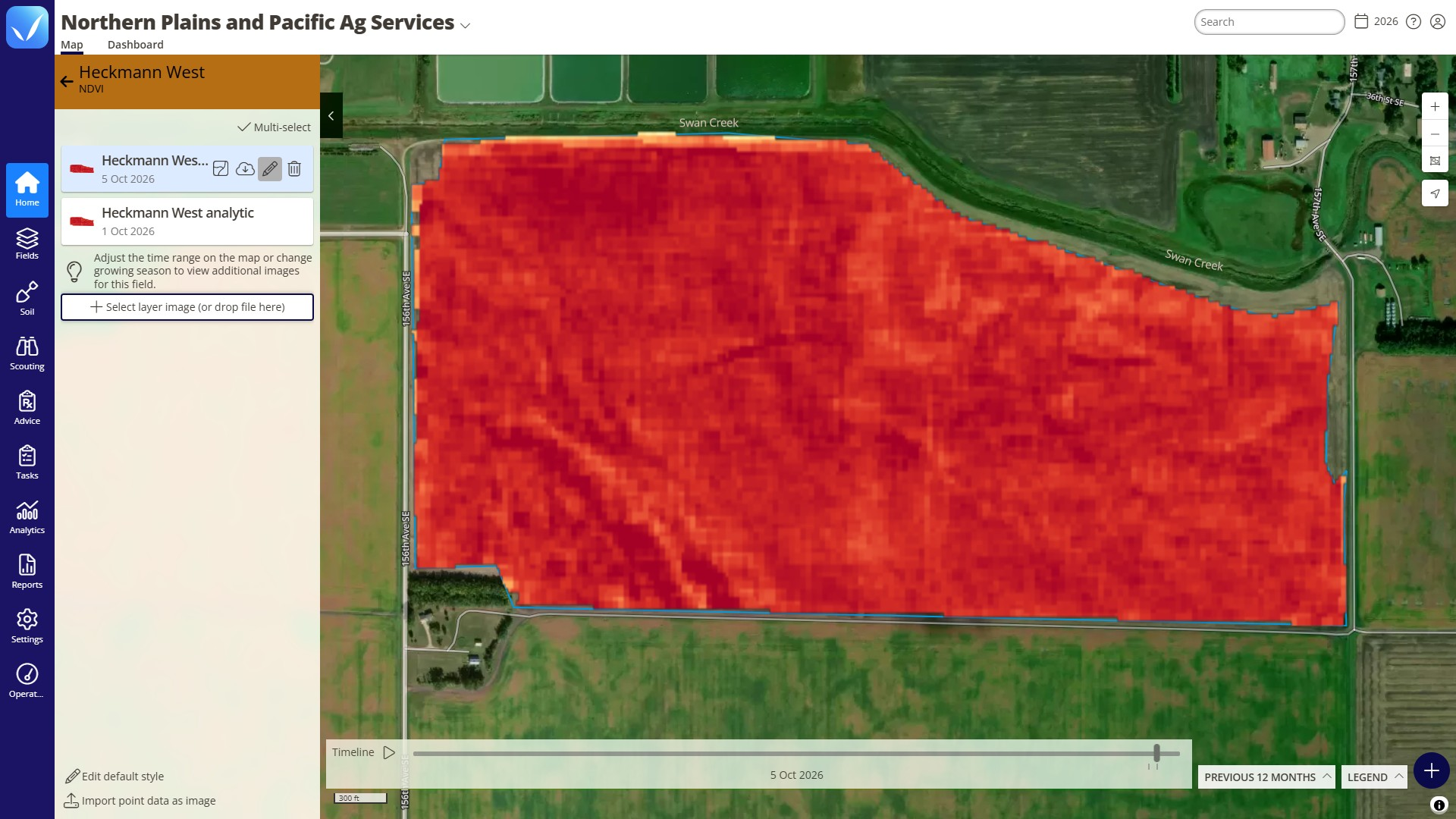
NDVI layer view on the Map tab of the FarmQA web app, showing the 5 Oct 2026 image for Heckmann West. The panel lists two imagery layers, 5 Oct 2026 and 1 Oct 2026. The red-to-orange heat map shows the field’s variation in crop vigor, and the timeline sits below it.
Look at current and past NDVI imagery to find patterns in crop vigor across a field. Move along the timeline to compare dates and spot trends you can build zones from.

Zone-based prescriptions

Turn management zones into variable rate prescriptions for seeding, fertilizer, or pesticide applications. Assign rates by zone, use auto-fill for even distribution, review product totals before publishing, and export VRT-ready shapefiles for application equipment.
And you don’t have to start over next season. Reuse existing management zones and write new prescriptions against them year after year.
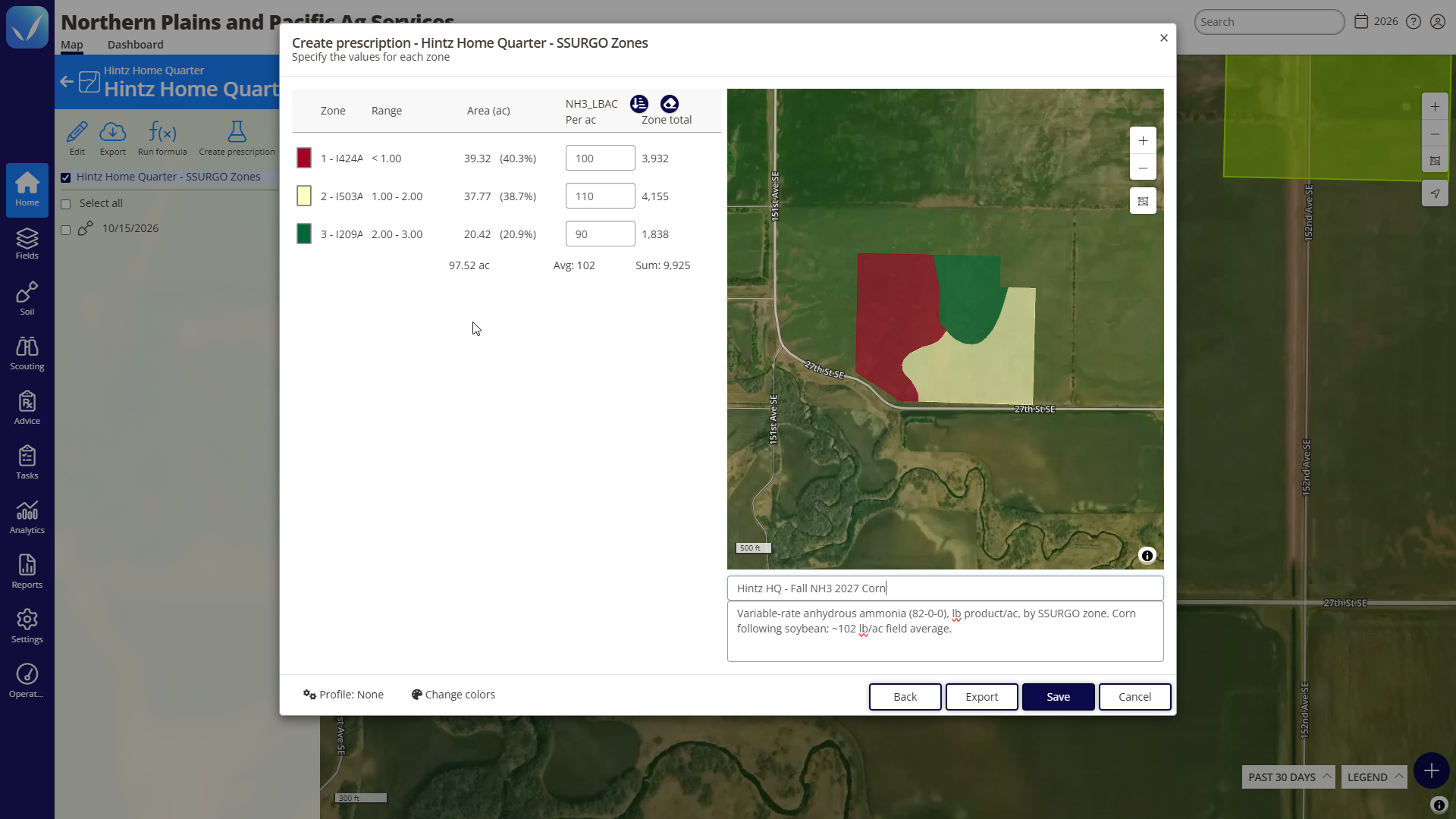
Create prescription window in the QA Advisor web app for Hintz Home Quarter, using SSURGO soil zones. It sets anhydrous ammonia rates of 100, 110 and 90 lbs per acre across three zones on 97.52 acres, for a 102 lb/ac average and 9,925 lb total, with the zone map and prescription notes beside it.
Advanced prescriptions

Put your agronomic formulas to work

When assigning a rate to each zone isn’t enough, Advanced Prescriptions adds formula-based calculations. Import soil test results, incorporate yield goals and apply your own agronomic formulas to calculate rates based on the conditions within each zone.
Run formulas across multiple fields at once while maintaining consistent agronomic logic. Adjust formulas by crop, region, grower, or other criteria, then map the results and export VRT-ready shapefiles for application equipment.
This gives you the precision of field-specific calculations without rebuilding the process one field at a time.
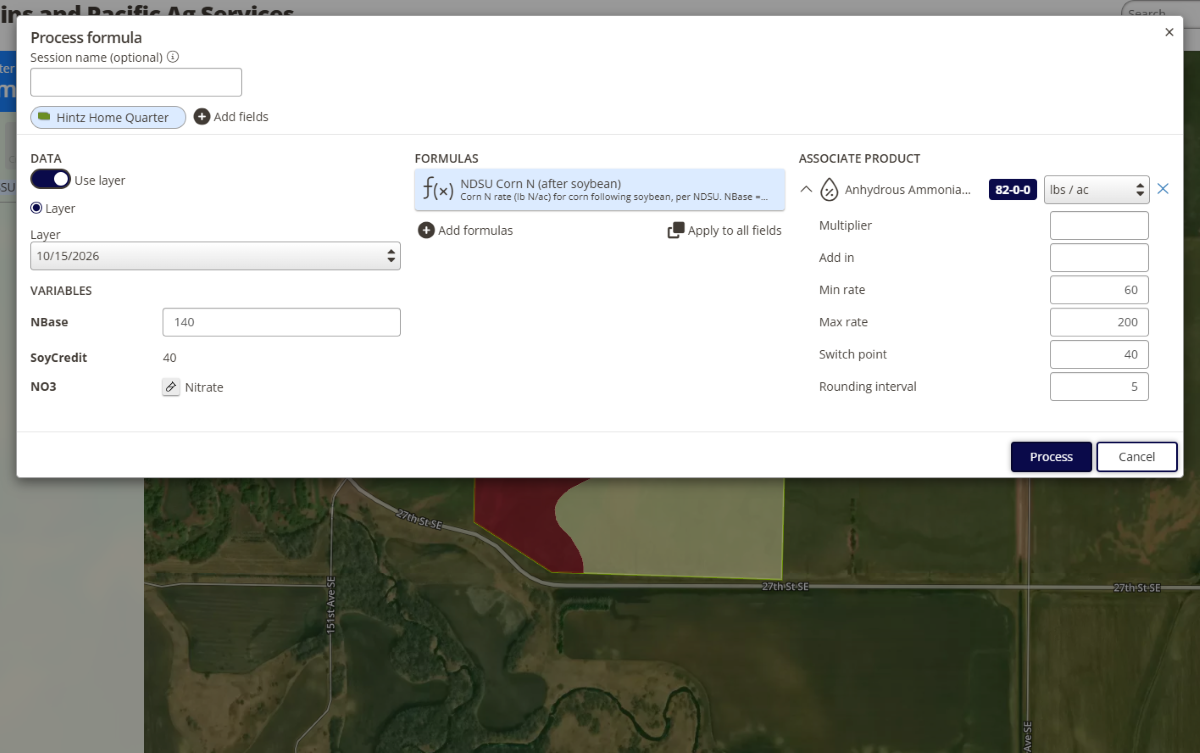
The Process formula window in QA Advisor for Hintz Home Quarter. It applies the NDSU Corn N (after soybean) formula using a nitrogen base of 140, a soybean credit of 40 and a soil nitrate layer, and sets anhydrous ammonia rates from 60 to 200 lbs per acre, rounded to 5 lbs. The zoned field map shows behind the window.

From prescription to application

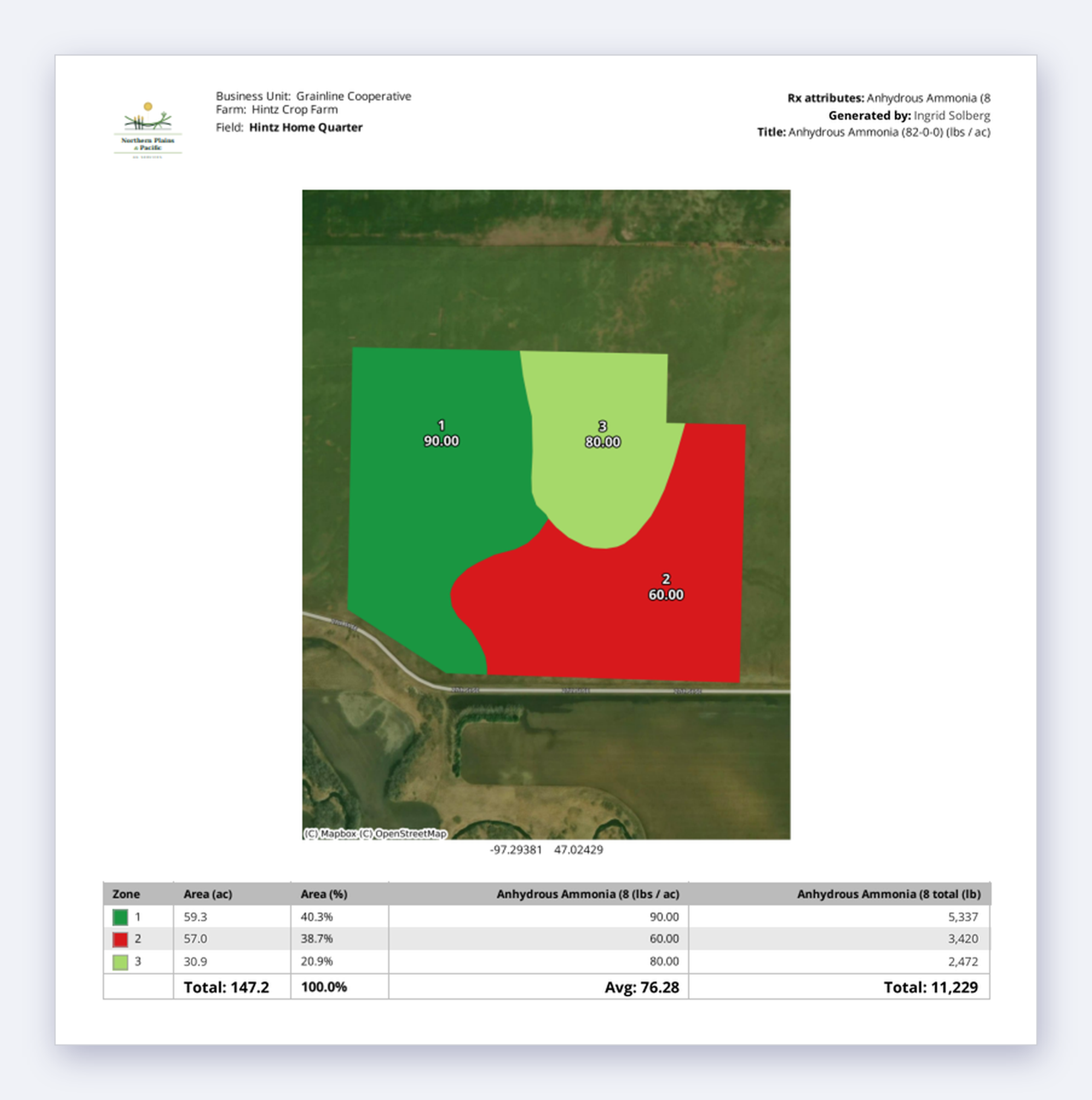
Give applicators what they need without rebuilding the work somewhere else. Export a PDF load sheet with the zone map, prescription details, and product totals, along with VRT-ready shapefiles for compatible application equipment.
Growers and team members can access zones and prescriptions from the web, while mobile access with GPS helps teams reference field information where the work is happening.
The result: fewer handoffs, fewer questions, and less reliance on USB drives to get prescriptions from the agronomist to the applicator.
A QA Advisor prescription load sheet from Northern Plains and Pacific Ag Services for Hintz Home Quarter, a 147.2-acre field. The zone map shows three anhydrous ammonia rates on satellite imagery: 90, 60 and 80 lbs per acre. A table below lists each zone’s acres, rate and total pounds, adding up to 11,229 lb at an average of 76.28 lbs per acre.

Maps made for the field

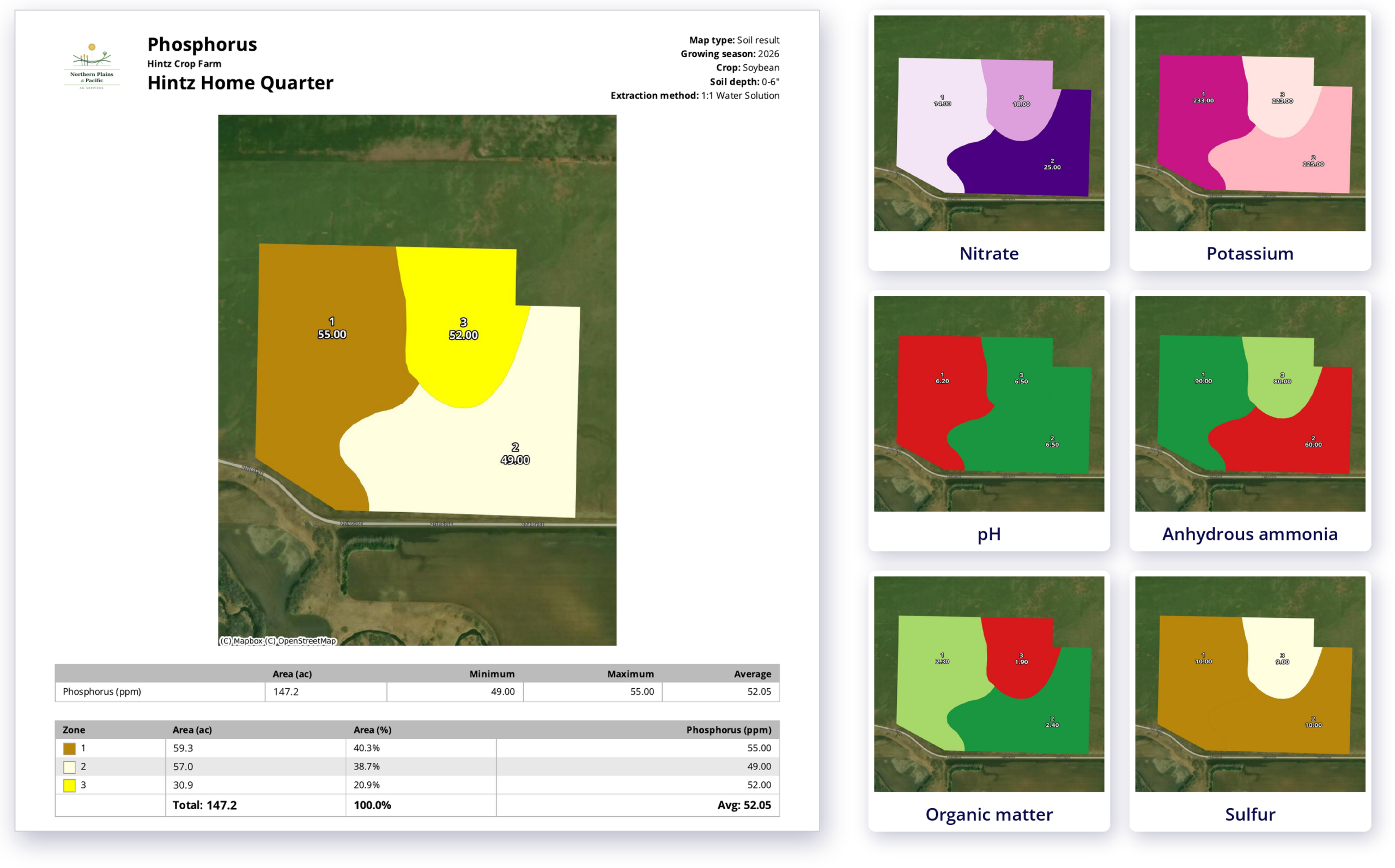
Turn field information into an organized Map Book your team can carry into the field, shop, or grower meeting. Draw or import field boundaries, assign crops, and bring together soil results into maps for a single field or an entire operation.

Map Books can be used on their own, with no prescription required, or alongside Basic zone-based or Advanced Prescriptions.
A QA Advisor map book for Hintz Home Quarter, a 147.2-acre soybean field. A full page shows the phosphorus soil test map with three zones, ranging from 49 to 55 ppm, plus field details and acres per zone. Beside it, six cards show other map layers for the same field: nitrate, potassium, pH, an anhydrous ammonia application map, organic matter and sulfur.
Every soil test result and application map for a field, gathered into one book your growers can keep.

Build on what you know

Management zones don’t have to be rebuilt every season. Reuse existing zones, bring in new field data, and compare results over time to refine your variable rate strategy as your field history grows.
Already have management zones? Import them into QA Advisor and keep working with the zones you’ve already built.
Pricing

Pricing that fits your operation

Whether you’re an independent agronomist or managing a large team, we offer flexible pricing based on your users and the capabilities you need. Add more as your operation grows.

SUPPORT

Real people. Practical support.

Have a question? Our team is here to help you get the most out of your FarmQA products. Whether you’re getting started, learning a new feature, or working through an issue, you can reach us by phone or email, or find answers in our online Support Center.

Make every zone count

Build management zones, create variable rate prescriptions, and turn your agronomic decisions into application-ready files with QA Advisor.

Ready to see which is right for you?