Home › Solutions › Field Mapping & Satellite Imagery

Field Mapping & Satellite Imagery

See what every acre is telling you

Know where to focus before you set foot in the field. Start with your field maps, then bring together satellite imagery and the spatial data you already have. See variability across each field, identify areas that need attention, and direct scouting, sampling, and other fieldwork where it matters most.

Field mapping

Map fields the way you work

Farm mapping starts with an accurate view of the fields you manage. QA Advisor gives you flexible field mapping tools to create, update, and organize field boundaries from the web or mobile app.

Draw field boundaries directly in your browser, drive them in the field with the mobile app, upload existing shapefiles, or sync field information from supported equipment platforms such as John Deere Operations Center and CNH.
Once your fields are mapped, you have a consistent field map for organizing scouting, sampling, imagery, prescriptions, and other field information across your operation.
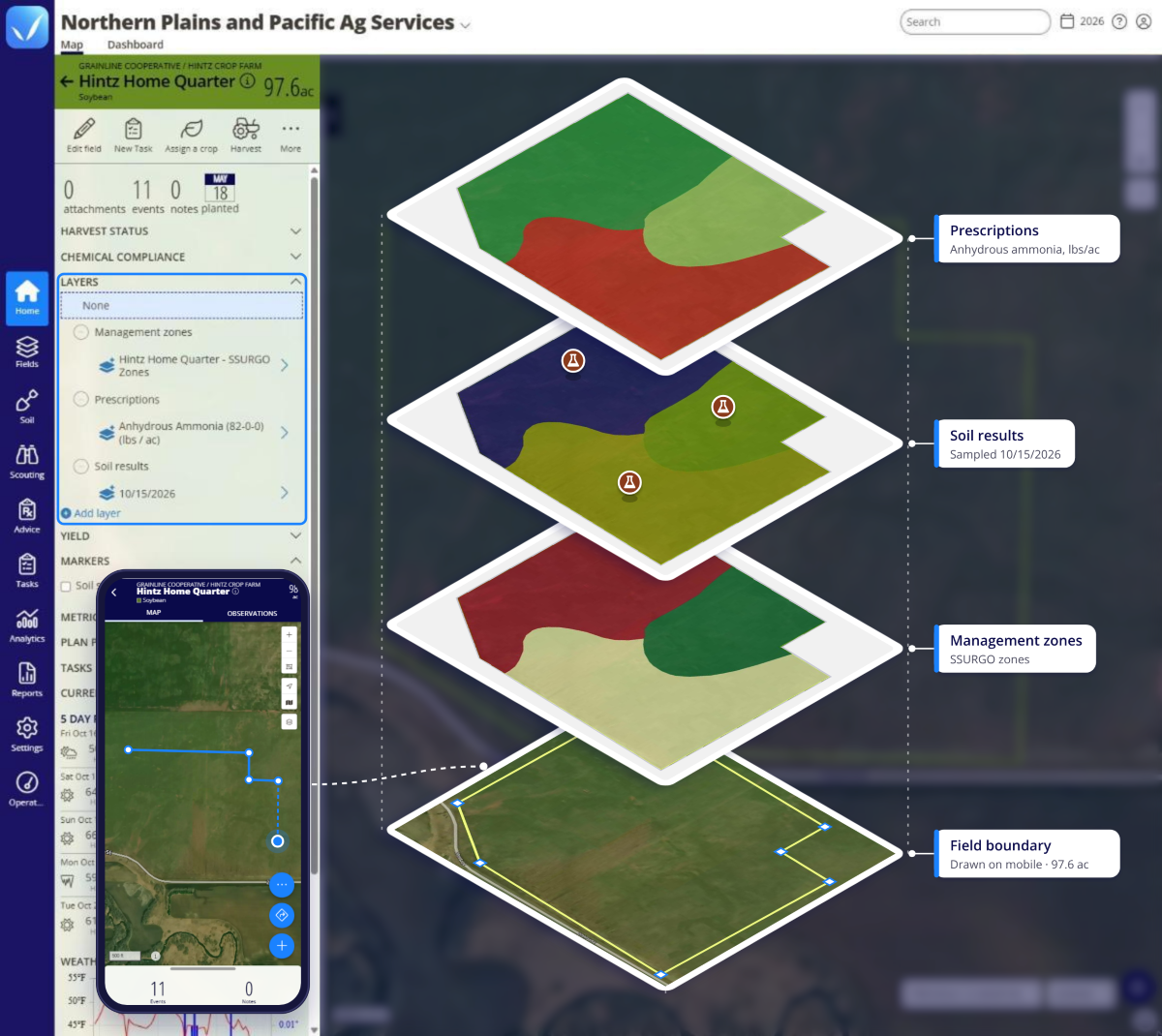
Hintz Home Quarter field in the FarmQA web app, with a phone showing its boundary being drawn in the mobile app. Four stacked map layers sit on the 97.6 ac field boundary: Management zones (SSURGO zones), Soil results (sampled 10/15/2026) and Prescriptions (Anhydrous ammonia, lbs/ac).
Map layers

Bring your field data into view

Your fields generate more than one kind of spatial information. Bring soil test results, yield history, satellite imagery, elevation data, and other spatial datasets into QA Advisor so you can see them together instead of switching between different tools.

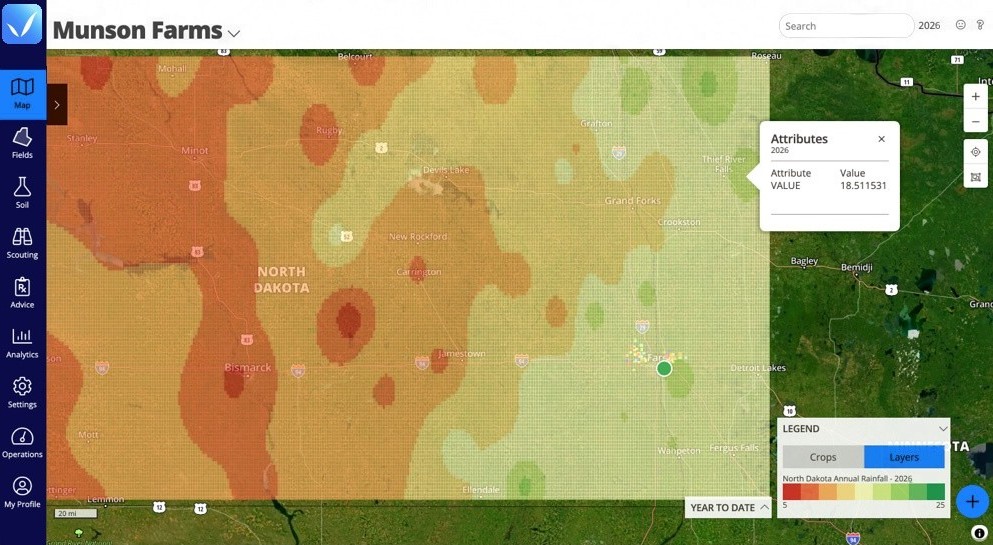
View current conditions or look back over time. Use time-based layers to follow changes such as NDVI throughout the growing season, or compare annual datasets such as yield maps from one year to the next. Global Map Layers let you overlay broader datasets, such as regional soil or precipitation information, across multiple fields.

Access your map layers on the web or mobile app so the information you use to make decisions is available whether you’re in the office or in the field.

Make the map work for you

Choose how your data is displayed by changing the attribute used to color the map, adjusting data ranges and legends, or saving a default legend for datasets you use repeatedly. Upload KML/KMZ, GeoTIFF, and ESRI Shapefile formats directly into QA Advisor.

See the difference. Then do something about it.

Seeing variability is only useful if it helps you decide what to do next. Because mapping, imagery, scouting, sampling, recommendations, and field records live in QA Advisor, what you see on the map can become part of the work your team is already doing. Use spatial data to narrow your focus, investigate variability, and direct fieldwork to the places where it can have the greatest impact.

Directed scouting

Use current imagery on web or mobile to identify areas of variability and direct scouting toward the parts of the field that deserve a closer look.

Target soil sampling

Compare imagery, soil information, management zones, and other layers to help identify patterns across a field and make more informed sampling decisions.

Support better recommendations

Use field-level spatial information to add context when evaluating crop conditions and developing recommendations. See where conditions differ instead of treating every acre the same.

Build zones & variable rate prescriptions

Use imagery to identify field variability, define management zones, and guide variable rate prescriptions. Turn what you see on the map into more targeted nutrient applications.

Satellite imagery

Choose the satellite imagery that fits your fields

Satellite imagery gives you another way to see variability that may be difficult to spot from the road or even while scouting. QA Advisor brings imagery into the same field view as your other spatial data so you can compare what you’re seeing from above with what you already know about the field. Use vegetation indices including NDVI, NDRE, and MSAVI to monitor crop variability and change throughout the season.
Pricing

Priced for real operations

Satellite imagery is an add-on to the QA Advisor platform. Imagery and map layers are priced per acre, reflecting the actual coverage you need rather than a flat platform fee.

SUPPORT

Real people. Practical support.

Have a question? Our team is here to help you get the most out of your FarmQA products. Whether you’re getting started, learning a new feature, or working through an issue, you can reach us by phone or email, or find answers in our online Support Center.

See what imagery can show you

See how satellite imagery in QA Advisor can help you spot field changes sooner, prioritize scouting, and make more informed in-season decisions.

Ready to see which is right for you?