
Tasks
QA Advisor Tasks
Assign the right work to the right person. Know when it is done.
Agronomists spend a surprising amount of time chasing confirmation. Did the applicator spray that field? Did the technician finish sampling? Did anyone follow up on that scouting flag? QA Advisor Tasks replaces that back-and-forth with a structured assignment workflow built into the platform. Assign any field activity, track completion in real time, and get records generated automatically when the work is done.
One add-on, every workflow
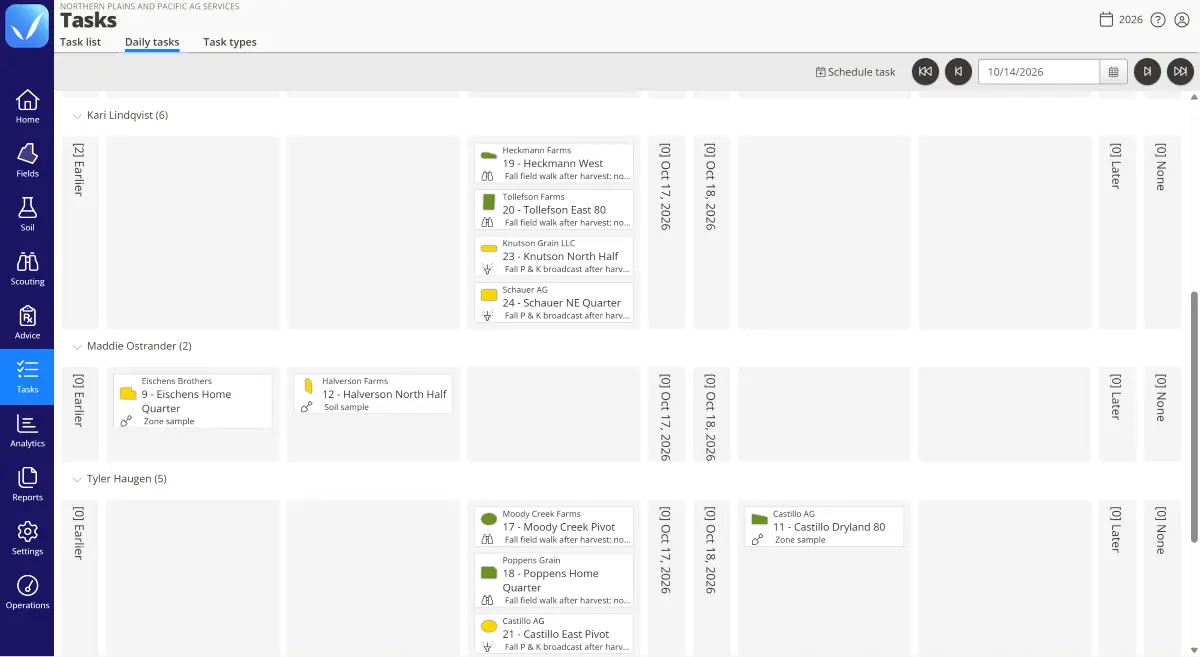
Assign any field activity to a specific person, with a field, a due date, and any instructions they need
Associate work with geolocations — any field, greenhouse, or block
See what’s done and what’s outstanding without calling anyone; reassign work when plans change or workload needs balancing
When a task is completed on mobile, QA Advisor captures the conditions at that moment and generates the record automatically — no manual entry after the fact
Tasks work across the QA Advisor platform: the same add-on that dispatches a scouting visit also generates an application record when an applicator completes their work in the field

Where Tasks fits in QA Advisor

Crop scouting
Advice & recommendation delivery

Application tracking & compliance
Soil sampling
Who uses Tasks
Independent agronomists (with technicians/seasonal staff)
Co-ops and ag retailers
Farm managers (with in-house applicators)
Give your applicators clear field-by-field work orders. Get application records generated automatically when they complete their work. No paper logs, no end-of-day data entry.
Processors
Your grower contracts require documentation of every application: what was applied, at what rate, on which field or block, by whom, and under what conditions. With Tasks, contracted growers assign applications to their operators, and QA Advisor records each one the moment it’s completed. Your field reps get field-check tasks for each grower, so you know which fields have been visited and when. No reconstructed paperwork. A verifiable record, generated in the field.

How it works in the field
Add Tasks to your plan
Tasks is an add-on for QA Advisor. Turn it on for your whole team or just the people who need it, and add it to your plan anytime.
SUPPORT
Real people. Practical support.
Have a question? Our team is here to help you get the most out of your FarmQA products. Whether you’re getting started, learning a new feature, or working through an issue, you can reach us by phone or email, or find answers in our online Support Center.
Frequently asked questions
Tasks is available as an add-on to QA Advisor, priced separately from the base platform. Contact us to discuss pricing for your team size and workflows.
Tasks integrates with crop scouting, soil sampling, application records, and recommendation delivery. It’s a platform-wide add-on, not a feature of one specific solution.
When a task is marked complete on mobile, QA Advisor captures the completion timestamp and any details entered by the assignee. For application tasks, it generates an application record automatically. For scouting tasks, it marks the assignment complete and makes any notes or observations available in the platform.
Yes. Tasks can be reassigned at any time. Managers can also see outstanding tasks across all assignees and redistribute workload when needed.
Assignees need at minimum an operator role in QA Advisor to complete tasks. The role required depends on the type of work being assigned — scouting, sampling, and application tasks each have their own role considerations. Contact us to find the right fit for your team structure.