Home › Solutions › Crop & Field Planning

Crop & Field Planning

Build the plan and keep the season moving.

Build crop plans for every field, from crop rotations and seed selections to fertilizer rates and application timing. Turn those plans into a costed input list you can share with growers or retailers, then track and manage the plan as the season unfolds.

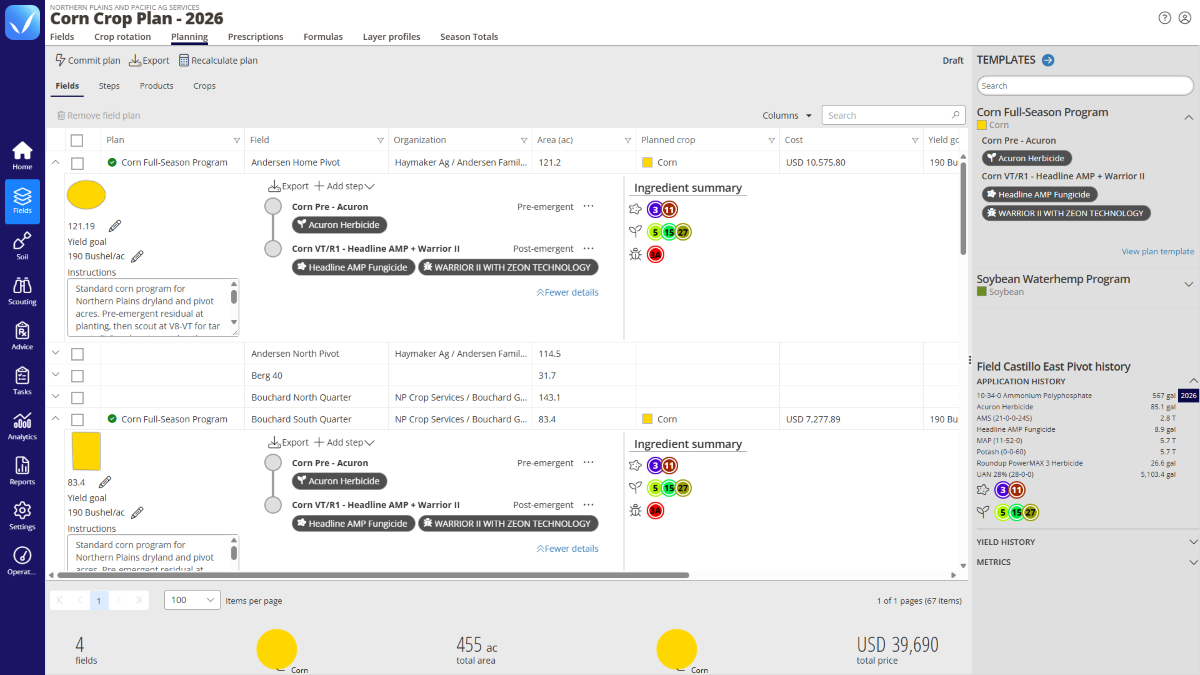
QA Advisor crop plan template showing seasonal application steps, products, rates, and mode of action groups.
Build reusable crop plan templates with application steps, products, rates, and timing, then apply them across fields and customize as needed.
Templates

Build once. Plan across fields.

Create reusable crop plan templates with yield goals, steps, products, rates, and timing you expect for the season. Apply a plan across multiple fields, then customize individual fields when their needs are different. From planting and fertility to herbicide and fungicide applications, you start with a plan instead of starting over for every field.

Input costs

Turn the plan into an input shopping list

Know what the season’s plan requires before inputs are purchased. Add product pricing and QA Advisor calculates costs by product and across the full plan. Then generate a detailed input shopping list with quantities, cost per acre, total costs, and blend breakdowns.

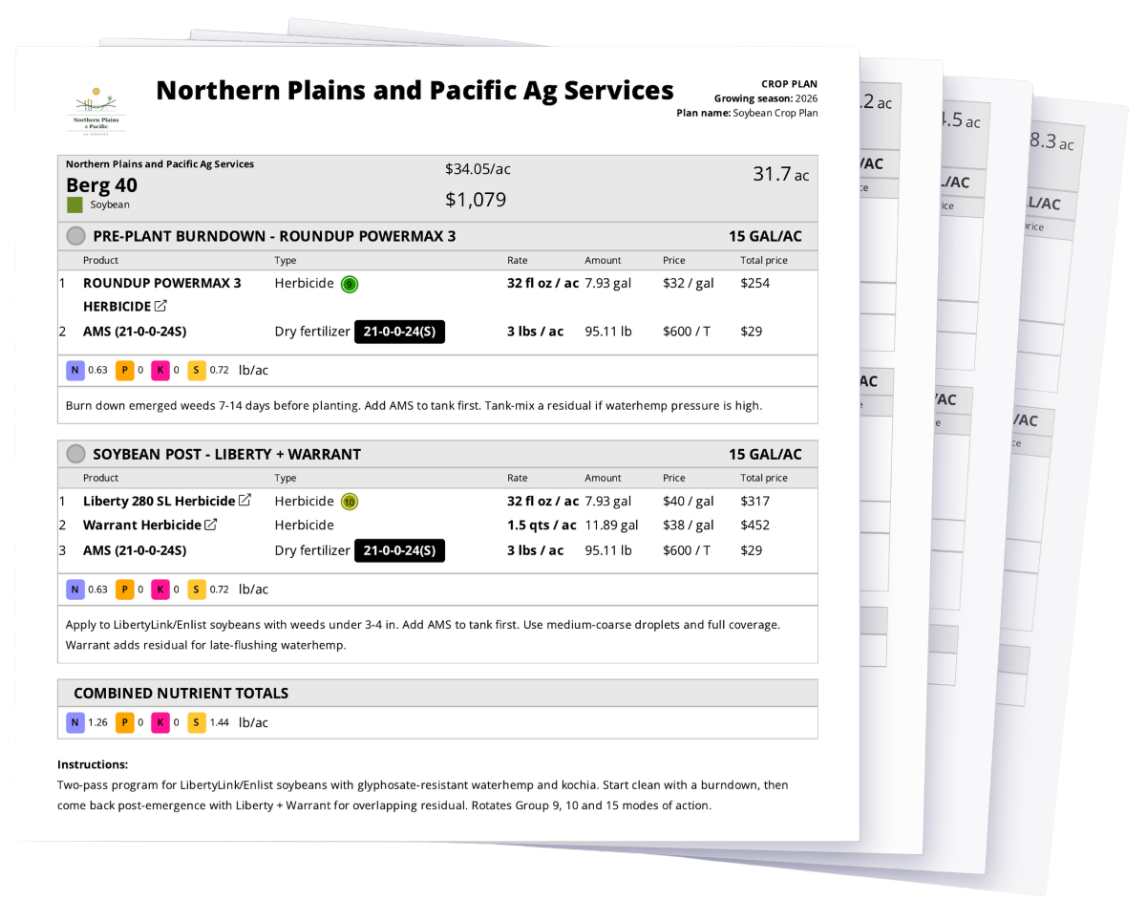
The export includes a total cost summary by product type, including blend breakdowns, price per acre, total area, and grand total. Built to be shared directly with a co-op, retailer, or grower.
A QA Advisor crop plan from Northern Plains and Pacific Ag Services, with the pages fanned out. The front page shows Berg 40, a 31.7-acre soybean field with a total cost of $1,079 ($34.05 per acre). It lists two passes at 15 gallons per acre: a pre-plant burndown of Roundup PowerMax 3 with AMS, and a soybean post pass of Liberty 280 SL, Warrant and AMS. Each product shows its rate, amount, price and total, followed by combined nutrient totals and grower instructions.
One plan, one page per field, with every pass, rate and cost included.
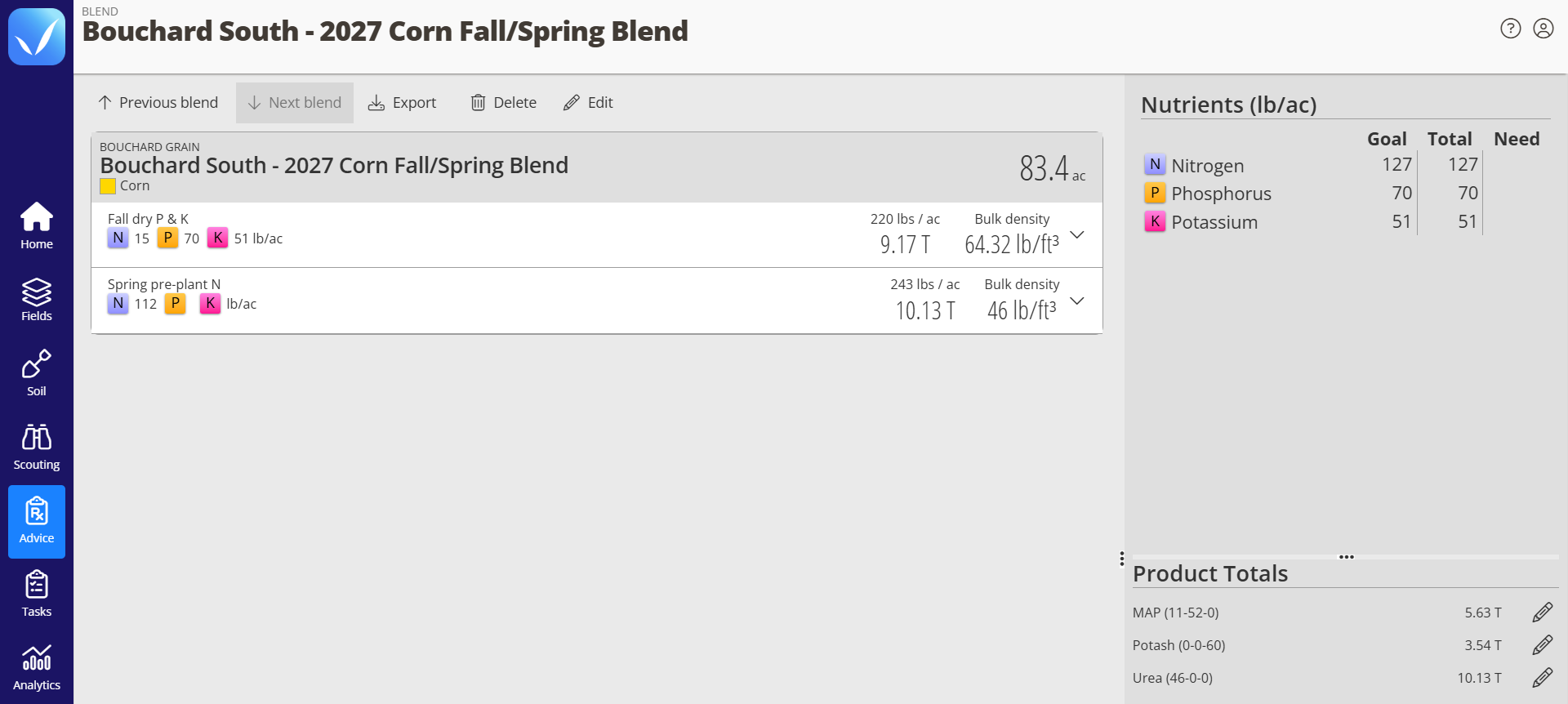
QA Advisor Nutrient Blender showing the “Bouchard South – 2027 Corn Fall/Spring Blend” for an 83.4-acre corn field from Bouchard Grain. It has two passes: a fall dry P and K blend at 220 lbs per acre (9.17 tons), and a spring pre-plant nitrogen pass at 243 lbs per acre (10.13 tons). The nutrient panel shows goals of 127 lb N, 70 lb P and 51 lb K per acre, all fully met by the blend. Product totals are 5.63 tons of MAP (11-52-0), 3.54 tons of potash (0-0-60) and 10.13 tons of urea (46-0-0).
Split fertility across fall and spring passes, and see nutrient goals met and product tonnage calculated for the whole field.
Nutrient Blender

Plan fertility without the spreadsheet

Nutrient Blender complements crop planning with a faster way to build flat-rate fertility plans. Set nutrient goals based on expected yield, account for nutrients already available in the soil, and calculate the product rates needed to close the gap.

Build single- or multi-product blends and adjust rates to match your fertility strategy. It’s a faster way to work through pre-season nutrient needs without building and maintaining your own spreadsheets.

In season

Execute the plan. Adjust when you need to.

See the progress of each field against its crop plan, so you know what’s complete, what’s changed, and what’s still ahead. As the season progresses, create recommendations directly from the crop plan with planned products and rates already filled in, reducing manual data entry and keeping a clear record of what was planned versus what actually happened.
When conditions change, adjust products, rates, acreage, planting details, or individual steps. View plans and make updates from the QA Advisor mobile app while you’re in the field. At the end of the season, you have a record of what was planned, what changed, and what actually happened to help inform next year’s plan.
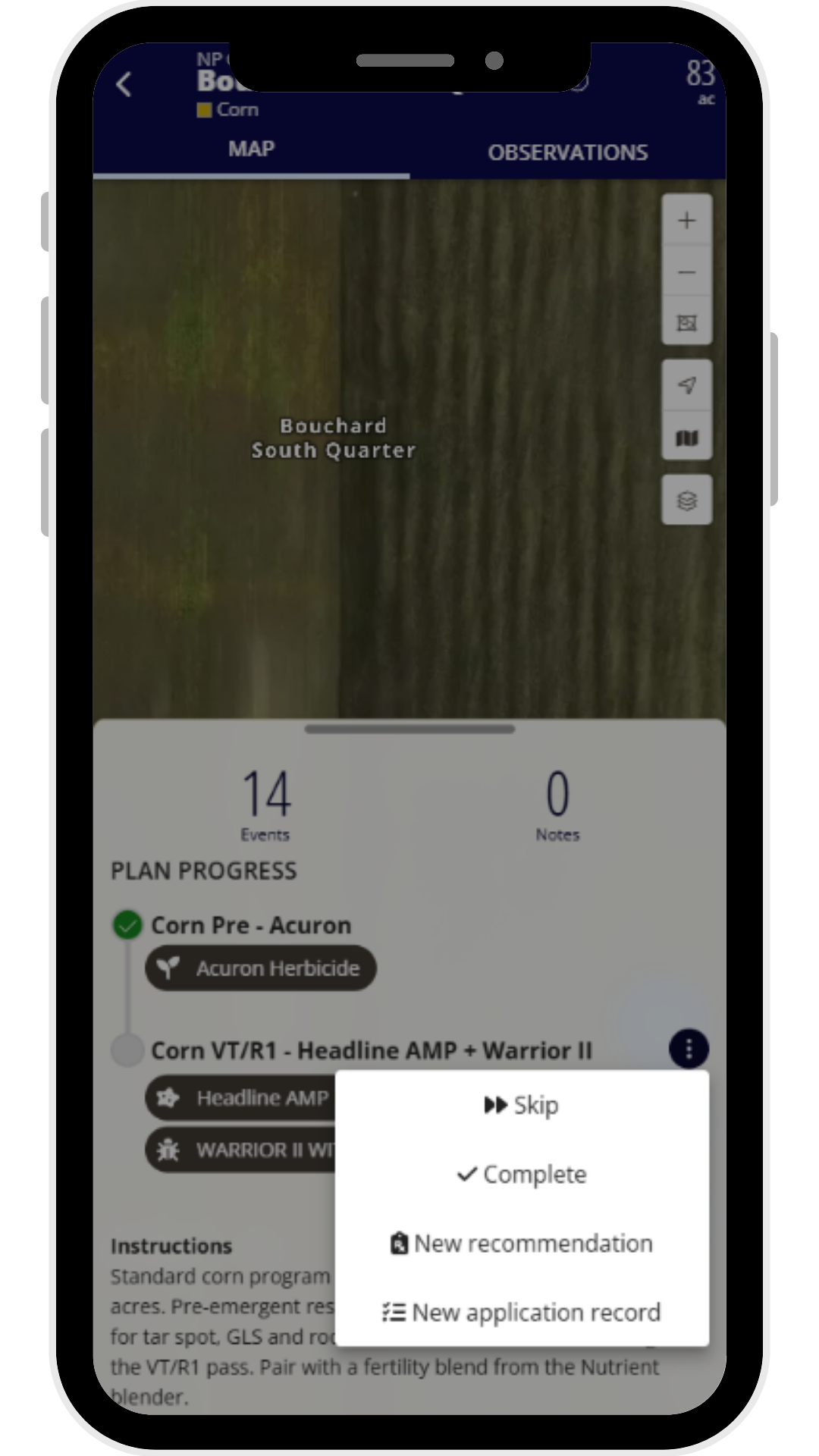
Plan Progress for the field Bouchard South Quarter in the QA Advisor by FarmQA mobile app. Corn Pre - Acuron is marked complete. The menu for the Corn VT/R1 - Headline AMP + Warrior II step is open, with the options Skip, Complete, New recommendation and New application record.
See where each field stands against its crop plan while you’re in the field. From any step, you can mark it complete, skip it, or create a recommendation or Application record with the planned products and rates already filled in.
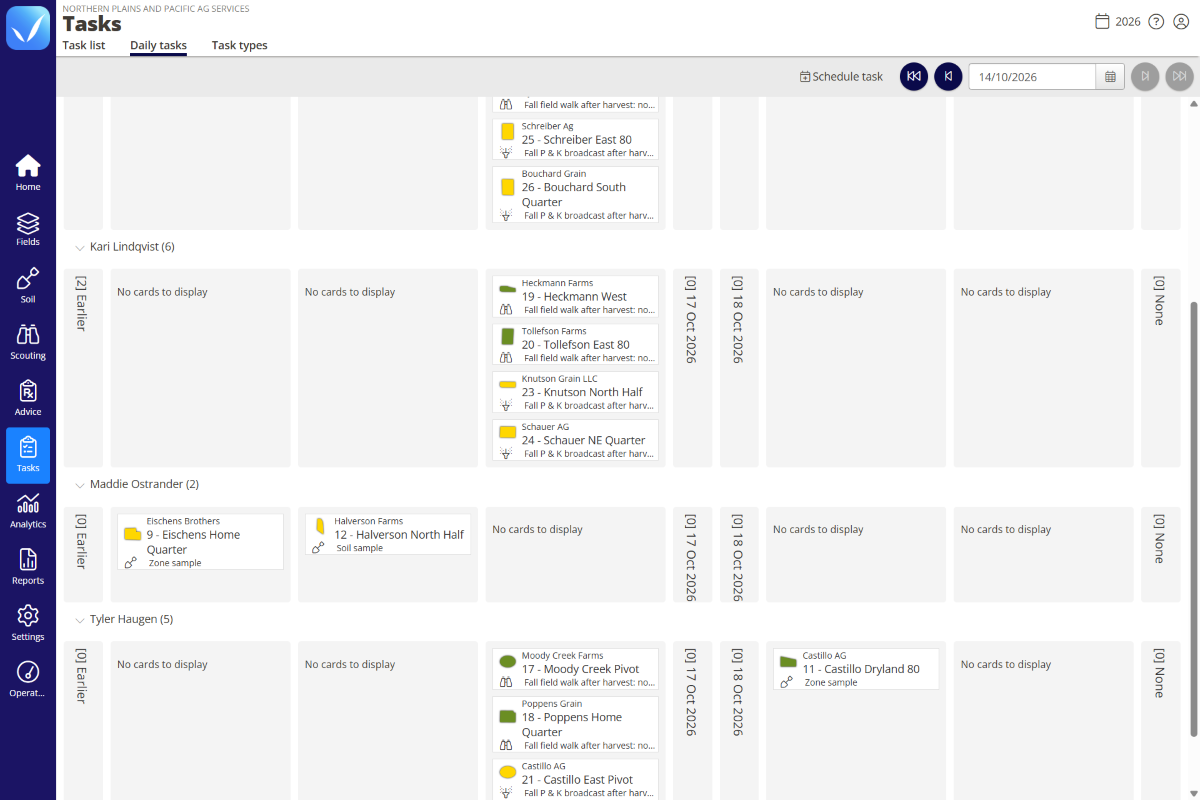
QA Advisor task list showing fieldwork assigned to team members with task type, field, status, and completion details.
Tasks

Keep the next step moving

A crop plan is only as good as what actually gets done. With the Tasks add-on, you can easily create tasks once a recommendation has been made for a particular crop plan step. Assign application steps to the right operator, track completion in real time, and generate application records automatically when the work is finished.
Everyone on your team knows what needs to happen next, and you know when it did.
FAQ

Frequently asked questions

Yes. QA Advisor uses reusable crop plan templates. Build a plan once for a crop type, set your steps, products, and rates, then apply it across as many fields as you need. Each field can be customized from there without changing the template.

Yes. You can create a recommendation directly from a crop plan step, with the products and rates from the plan already filled in. That means less retyping when it’s time to turn the season’s plan into action. The recommendation and the plan stay linked, giving you a clear record of what was planned versus what was actually written and applied.

Yes. Plans export as PDF or Excel. The PDF can include field shapes, product costs, and a full breakdown by step. The Excel export includes the same cost data in a format built for sharing with a co-op, retailer, or for use in your own planning process. The export includes total cost by product, price per acre, and grand total.

Yes. Crop plans in QA Advisor are living documents. You can edit product rates, add products to a step, adjust acreage for individual fields, or skip a step entirely if conditions make it unnecessary. Changes are available from both the web app and the mobile app while you are in the field.

Yes, with the Tasks add-on. Once a recommendation has been created from a plan step, you can assign it as a task to a specific operator with a due date and field instructions. When they complete it on mobile, QA Advisor captures the application details at that moment. Tasks is available as a QA Advisor add-on.

Pricing

Add Crop Planning to your operation

Crop Planning is an add-on module for QA Advisor. Contact our team to add it anytime. 

SUPPORT

Real people. Practical support.

Have a question? Our team is here to help you get the most out of your FarmQA products. Whether you’re getting started, learning a new feature, or working through an issue, you can reach us by phone or email, or find answers in our online Support Center.

Start planning your season in QA Advisor

Build a crop plan for your fields, create reusable templates, calculate input needs and costs, and keep the plan moving as the season unfolds.

Ready to see which is right for you?